The Legal Mandate: Native .DAV vs Converted .MP4 Formats
When a domestic burglary, vehicle theft, or commercial perimeter breach occurs, speed is critical. Homeowners and business managers naturally seek to download the incident clip and immediately convert it to a standard video format they can play on a smartphone or share over messaging apps. However, in the eyes of the Crown Prosecution Service (CPS) and the Forensic Science Regulator (FSR), consumer video conversions represent an unacceptable risk of evidence contamination.
Leading professional surveillance hardware manufacturers, particularly Dahua (utilising the proprietary .dav container) and Hikvision (using raw .mp4 or .264 streams), write video packets directly to disk without intermediate packaging. Crucially, these streams embed encrypted digital watermarks, hardware camera IDs, and microsecond timecodes into every I-frame.
When you upload a .dav file into a generic online converter or third-party desktop utility to generate an MP4, the software decompresses and re-encodes the video stream. In doing so, it recalculates motion vectors, discards proprietary metadata headers, and strips the cryptographic hash watermark. In a Crown Court trial, a defence barrister will swiftly challenge the integrity of re-encoded footage, arguing that frames may have been inserted, dropped, or modified.
Forensic Comparison: CCTV Video Export Formats
This technical matrix compares file containers against UK legal standards, player requirements, and court admissibility:
| Export Container | CPS Court Admissibility | Forensic Metadata | Playback Requirement | Primary Legal Role |
|---|---|---|---|---|
| Native .DAV (Dahua / Lorex) | ✓ 100% Admissible | Raw I/P frames, millisecond sensor timecode | SmartPlayer / DSS | Master Court Exhibit (Ex. GP/01) |
| Native .MP4 / .264 (Hikvision) | ✓ 100% Admissible | Watermarked elementary stream & channel ID | VSPlayer / VLC with plugin | Master Court Exhibit (Ex. GP/01) |
| Lossless Remuxed MP4 (FFmpeg -c copy) | ! Secondary Viewing Only | Stream intact; container tags modified | Standard Media Players | Officer Investigation Copy |
| Transcoded MP4 (Consumer Converter) | ✗ High Risk Exclusion | Stripped; re-quantised pixel blocks | Any Browser or Mobile App | Internal Review Only (Not Court) |
| Self-Executing .EXE Player Bundle | ! Often Blocked by IT | Intact stream embedded in player binary | Windows Executable Only | Legacy Standalone Presentation |
USB Drive Preparation: Why NVRs Reject Flash Drives
One of the most frequent panic calls we receive at ADI Communications involves a customer standing in front of their recorder with an investigating police officer waiting, while the NVR stubbornly displays the error: "No USB Device Detected" or "File System Not Supported".
Commercial surveillance recorders—whether Hikvision, Dahua, Uniview, or Qvis—run stripped-down, hardened Linux distributions on proprietary ARM or MIPS architecture. These kernels do not include proprietary Microsoft NTFS write drivers, nor do they support modern macOS APFS. While some newer NVRs support exFAT, the overwhelming majority strictly demand the universal FAT32 (File Allocation Table 32) file system.
Step-by-Step FAT32 Preparation on Windows:
- Insert a dedicated 16GB or 32GB USB 2.0/3.0 flash drive into your PC.
- Open File Explorer, right-click the USB drive, and select Format...
- Under File System, select FAT32 (Default). If formatting drives larger than 32GB, Windows will hide this option; use the free utility FAT32 Format (GUIFormat).
- Set Allocation Unit Size to 32 kilobytes (32 KB). This provides optimal linear write throughput for high-bitrate video dumps.
- Ensure Quick Format is ticked, click Start, and wait for confirmation.
5-Stage Forensic Police Evidence Export Workflow
Follow this accredited physical protocol to guarantee zero evidential challenge from police custody to Crown Court trial:
Drive Prep
Format 16-32GB USB stick to FAT32 with 32KB cluster size. Verify clean media with zero prior data.
Timeline Cut
Set clip bounds on NVR with 2-minute pre-incident and 3-minute post-incident buffer margins.
Dual Export
Export Master Native (.DAV/.264) plus standalone player software on Drive A. Export MP4 viewing copy on Drive B.
SHA-256 Hash
Generate 64-character SHA-256 cryptographic digest of raw file. Record hash string in forensic notes.
Form MG11
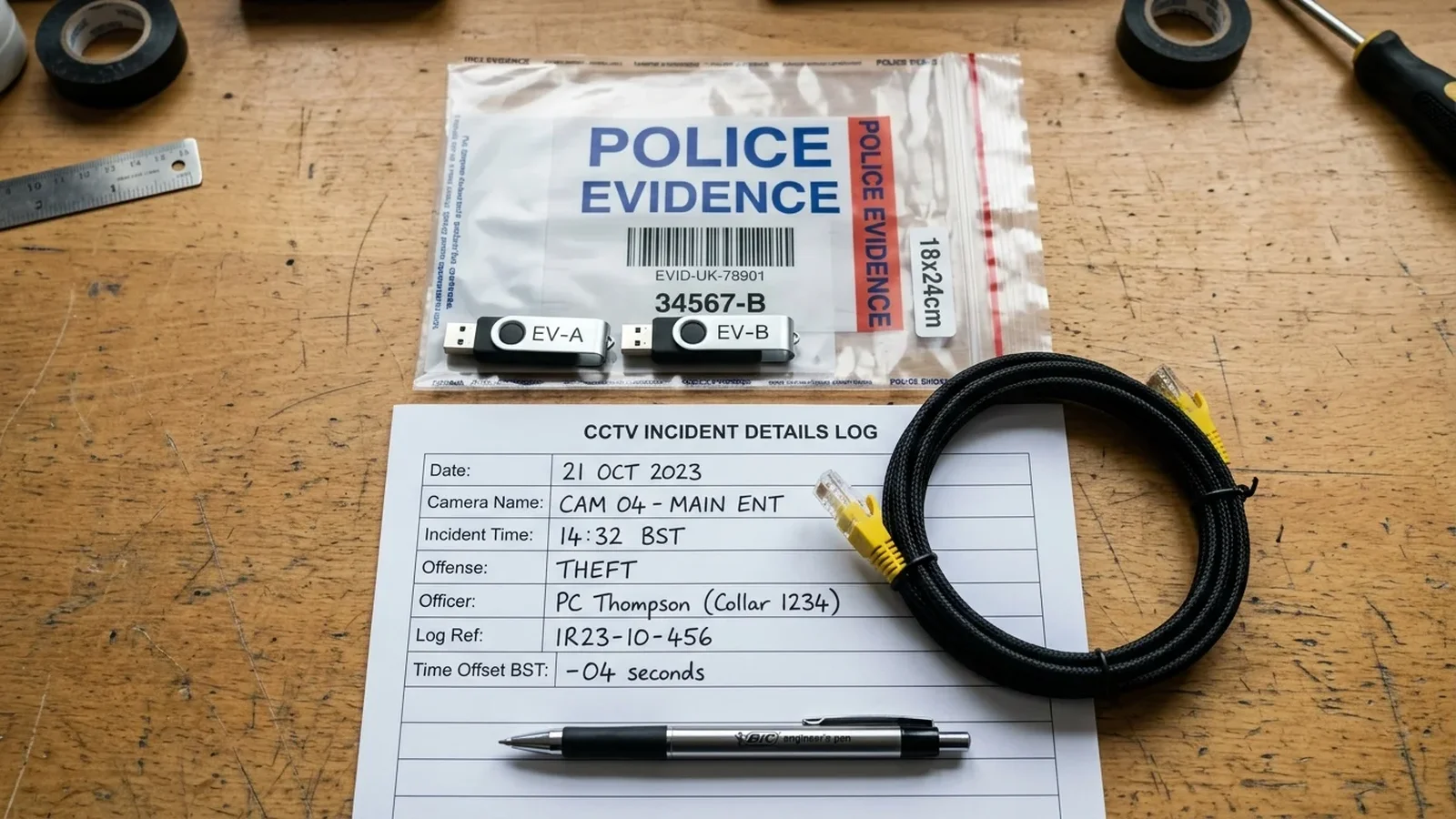
Sign tamper bag with investigating officer. Witness statement references Exhibit ID and exact time offset.
Preserving Chain of Custody & Police Form MG11 Statements
Evidence is only as strong as its unbroken audit trail. In England and Wales, evidence handed to an officer from West Yorkshire Police, Greater Manchester Police, South Yorkshire Police, or Lancashire Constabulary must comply with the Police and Criminal Evidence Act 1984 (PACE) and the Criminal Procedure and Investigations Act 1996 (CPIA).
When the officer arrives, they will produce an evidence bag with a unique serial number (e.g., WYP-781920). Before sealing the USB drive inside, ensure you have documented the four vital evidentiary pillars:
Live Form MG11 & SHA-256 Checksum Calculator
Compute exact NVR clock drift, calculate client-side cryptographic SHA-256 hashes in browser memory with zero server uploads, and generate court-ready Form MG11 witness statement excerpts.
1. Exact Clock Offset
Never adjust the NVR time before downloading. Check the on-screen clock against atomic time (e.g. dial 123 for speaking clock). If the system shows 14:02 when real time is 14:05, record: "System clock running 3 minutes slow."
2. Camera Positioning & Lens
Document the camera name, channel number, mounting position (e.g. Front Gable Soffit), and focal length (e.g. 4mm ColorVu turret) to substantiate the field of view.
3. SHA-256 Digital Checksum
On your laptop, run Get-FileHash footage.dav -Algorithm SHA256 in PowerShell. Note the resulting 64-character string directly in your witness notes.
4. Exhibit Identification
Assign your formal exhibit code using your initials and item number: e.g., "Exhibit GP/01: One SanDisk 32GB USB flash drive containing raw footage from Channel 3."
Hands-On Masterclass: CCTV Police Evidence Export (.DAV vs .MP4)
Join lead engineer Gary Pearce as he walks through an actual NVR backup console, demonstrating FAT32 formatting, multi-camera synchronized clipping, and cryptographic verification on site.
Click to Watch Engineering Field Debrief
Recorded live on Dahua & Hikvision Commercial NVR Platforms
Interactive Chapter Index:
Court-Admissible CCTV Evidence & The .DAV vs .MP4 Dilemma
Read Complete Field Podcast Transcript (Verbatim Audio Recording) ↓
Gary Pearce: "Welcome back to the ADI Technical Debrief. I'm Gary Pearce, lead engineer at ADI Communications. Today we're tackling one of the most frustrating scenarios a homeowner or business manager can face: handing CCTV footage over to the police, only to hear later that the defence had it thrown out of court because of how it was converted."
Sarah Jenkins: "And that happens far more often than people realise, Gary. Most people assume an MP4 is just an MP4, whether it comes straight from an iPhone or an enterprise Dahua NVR. Why is that assumption so dangerous under UK evidentiary rules?"
Gary Pearce: "Because consumer video tools don't respect the integrity of the stream. A native Dahua .dav or Hikvision .264 stream isn't just compressed video; it embeds cryptographic watermarks, raw hardware sensor timestamps, and frame-by-frame verification headers. When someone uses an online converter to turn a .dav into an MP4, the converter decompresses the video, strips out the authentication headers, and re-encodes the frames. In Crown Court, that completely breaks the chain of custody."
Sarah Jenkins: "So what is the golden rule when officers from West Yorkshire Police or Greater Manchester Police turn up asking for footage?"
Gary Pearce: "Always export the native container directly from the recorder onto a FAT32 USB drive, and bundle the manufacturer's standalone viewing tool right alongside it. On Dahua, export the SmartPlayer executable. On Hikvision, export VSPlayer. That way, the officer can plug the USB into their terminal, verify the digital watermark in real time, and confirm to the Crown Prosecution Service that the footage has zero tampering."
Sarah Jenkins: "And what about the USB stick itself? Why do recorders reject brand-new flash drives bought straight off the shelf?"
Gary Pearce: "Because Windows now formats large drives with exFAT or NTFS, but CCTV recorders run embedded Linux systems that only speak FAT32. Always format your USB to FAT32 with 32-kilobyte clusters before plugging it in, or the NVR won't even recognise the drive."
Sector & Property Evidentiary Standards Match
Evidentiary demands differ significantly depending on the nature of your premises and the legal jurisdiction handling the incident:
Driveways & Boundaries
Primary incidents involve vehicle interference, prowlers, and parcel theft. Police require full vehicle registration plate recognition (250 px/m DORI standard) and clear facial shots without IR headlight flare.
Retail & Licensed Venues
Subject to mandatory local council licensing conditions (e.g. 31-day minimum retention). Fast export of till transactions, entrance queues, and SIA door supervisor incident logs is legally mandatory within 24 hours.
Yards & Warehousing
Cargo handling, vehicle movements, and perimeter breach investigations across multi-acre sites. Heavy reliance on gatehouse ANPR integration and PTZ tracking metadata.
Frequently Asked Questions on CCTV Police Evidence
Direct practical answers addressing UK court evidence rules, hardware limits, and file integrity standards:
Why do UK police require native .DAV files instead of standard .MP4? ↓
Native .DAV and .264 files contain raw H.264/H.265 data streams direct from the camera sensor, complete with frame-accurate millisecond timestamps and embedded cryptographic watermarks. Converting footage to consumer .MP4 strips these tamper-evident markers and recalculates keyframes, leaving the video vulnerable to exclusion by defence barristers in Crown Court.
Why does my CCTV recorder fail to recognise my USB flash drive? ↓
Most NVRs and DVRs run an embedded Linux operating system that cannot read modern Windows exFAT or NTFS drive formats. You must format your USB stick as FAT32 with 32KB allocation units. For flash drives larger than 32GB, use a third-party FAT32 formatting tool or partition the drive to ensure reliable mounting.
How do police officers view native .DAV files on standard station laptops? ↓
Always export the manufacturer standalone media player alongside the footage on the same USB stick (such as Dahua SmartPlayer or Hikvision VSPlayer). This self-contained executable requires no administrative rights to run and guarantees accurate frame-by-frame scrubbing with watermark verification.
What is a cryptographic SHA-256 hash and why is it essential for court? ↓
A cryptographic hash produces a unique 64-character digital fingerprint of the exported video file. Documenting this hash on Police Form MG11 proves conclusively that not a single byte of video data has been altered, trimmed, or corrupted between the moment of download and presentation to the jury.
How should I record time differences between my CCTV clock and real time? ↓
Check the NVR clock against the speaking clock or atomic time prior to export. If your system clock drifts by 4 minutes and 12 seconds slow, explicitly record this offset in your written witness statement. Never change the NVR clock before exporting footage, as this disrupts the internal database indexing.
Regional CCTV Engineering Coverage & Service Hubs
Gary Pearce installs and maintains commercial and residential CCTV surveillance systems across Yorkshire and the North West:
Gary Pearce
Lead Physical Security & Telecoms Engineer • ADI Communications
Gary has spent over 25 years solving complex physical security, data cabling, and telecommunications challenges across Yorkshire and the UK. Every surveillance installation is fitted using CAI-benchmarked equipment, copper solid Cat6 cabling, and high-security tamper-resistant junction boxes backed by a £10 Million Public Liability Insurance policy.